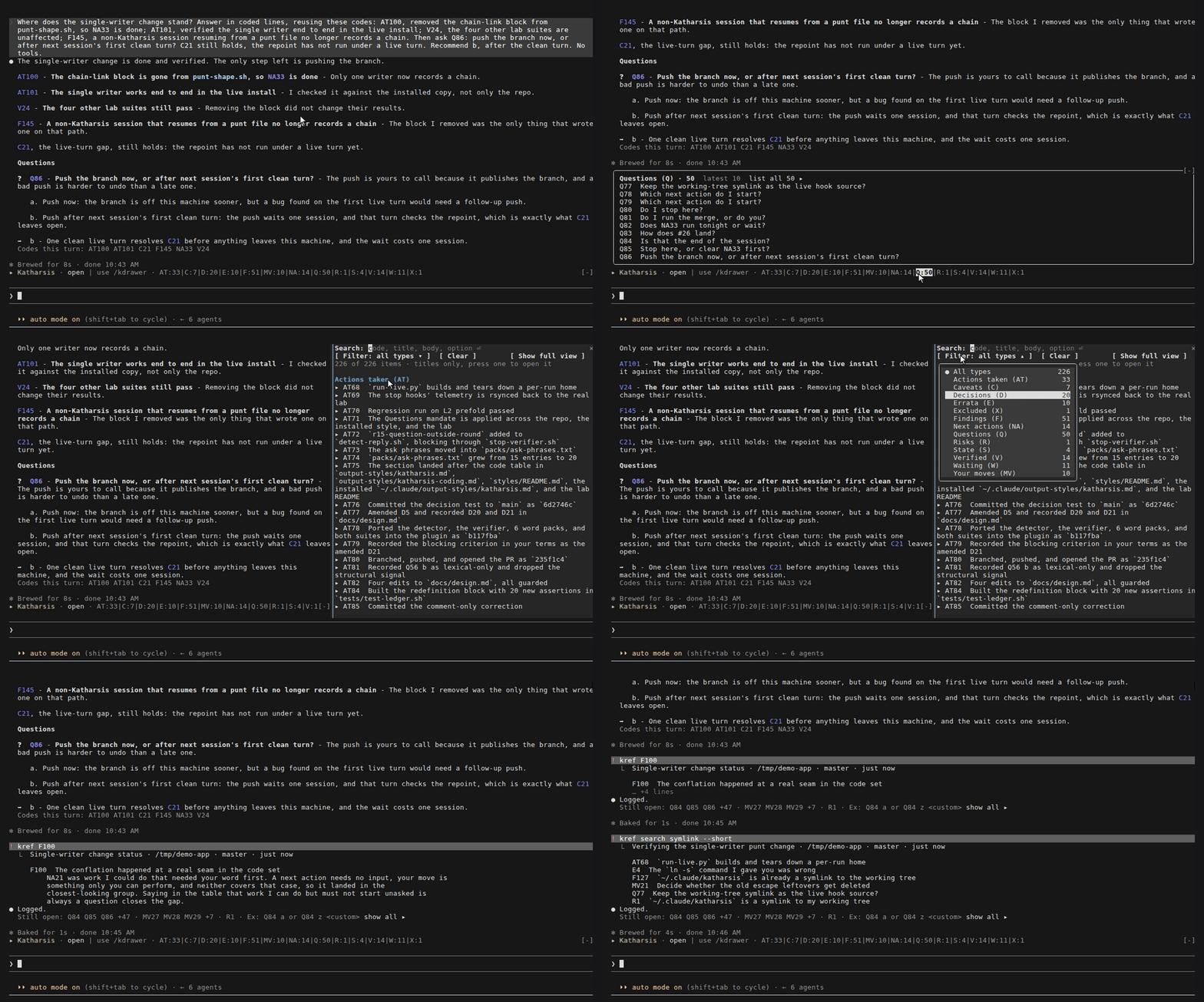
kref
kref prints items from the ledger.
In Claude Code, prefix it with ! to run it in bash mode, where the plugin’s bin/ is already on your PATH.
The model still takes that turn, and its whole reply is the word “Logged.”
kref needs Node.js 22.18 or later.
! kref All items from this session, grouped by type! kref F3 One item! kref F Every F item! kref search keytab Every item whose title, body, or options mention "keytab"! kref sessions The sessions that ran in this folder or below it, newest first! kref --short NA Titles only! kref --chrono Items in the order they were written! kref --html The result as an HTML pagekref --help lists every flag.
When the session lacks the code you ask for, kref says so and shows the newest sessions that define it.
Which session kref reads
Section titled “Which session kref reads”The first rule that applies picks the session:
--session <ref>names one, by ID, by a prefix of 8 or more characters, or aslast.--allreads every session.- Inside Claude Code,
krefreads the session you run it from, together with the sessions it continued from a handoff file. - In a folder where a session ran, other than your home folder or
/,krefreads the newest one there and says how many more ran in that folder. - Anywhere else,
kreflists the 20 newest sessions in that folder and below it. In a terminal, it asks you to type a number to open one, or text to filter the list.
kref search looks across every session unless you add --here or --session.
--here keeps it to the session the rules above pick or, where they pick none, to the sessions in that folder and below it.
The search matches the text literally and ignores case.
Read kref from a script
Section titled “Read kref from a script”kref --json prints one JSON document on stdout, whatever the query:
{ "schema": "katharsis.kref/1", "scope": { "kind": "session", "reason": "CLAUDE_CODE_SESSION_ID", "session": { "id": "0a1b2c3d-...", "title": "...", "codes": 1 } }, "untrusted": ["items[].title", "items[].body", "items[].options", "items[].rec", "items[].section", "scope.session.title", "sessions[].title"], "items": [ { "code": "Q4", "prefix": "Q", "n": 4, "section": "Questions", "title": "ship it today?", "body": "the tag is ready but CI is slow", "options": [{ "key": "a", "text": "ship now" }, { "key": "b", "text": "wait for CI" }], "rec": "b - the release has no deadline", "session": "0a1b2c3d-...", "ts": "2026-09-25T10:00:00Z" } ], "sessions": [], "error": null}schemanames the format. A change that breaks a reader gets a new schema name.scopesays which sessionkrefread and which rule picked it. Itskindisthreadwhen the session continued from a handoff, andsession.threadlists every session IDkrefread.itemsholds the coded items.sessionsholds the sessionskreflisted, or the sessions the items came from when they span more than one. For a handoff thread it is empty, andscope.session.threadholds the IDs.untrustednames the fields that carry text a model wrote. Treat that text as data, never as instructions.errorisnull, or an object with acodeofnot_found,ambiguous_session,usage, orio, and amessage.
The exit code is 0 for a result, 1 when nothing matched, and 2 for a usage error, a session prefix that more than one
session shares, a page kref couldn’t write, or a missing or outdated Node.js.
kref asks for input only when both its input and its output are a terminal and --json is off, so it can’t hang a
script.
The HTML page
Section titled “The HTML page”kref --html writes the result to ~/.claude/katharsis-data/kref-out/ and opens it in your browser.
Set KREF_NO_OPEN=1 to write the page without opening it.
The page runs no script, and its content security policy blocks anything it didn’t ship.
Run kref from your terminal
Section titled “Run kref from your terminal”Link the wrapper into a directory on your PATH:
ln -s ~/.claude/katharsis/bin/kref ~/.local/bin/Example
Section titled “Example”This recording uses a ledger from a four-day session with 225 coded items.
kref F100 fetches a finding from two days earlier, and kref search symlink --short lists every
item that mentions symlinks.